


Logging in to your SpinoGambino account is as easy as opening the door to a magical world full of enticing wins. Just a few clicks and they’re all within reach.

SpinoGambino login [How to log in]

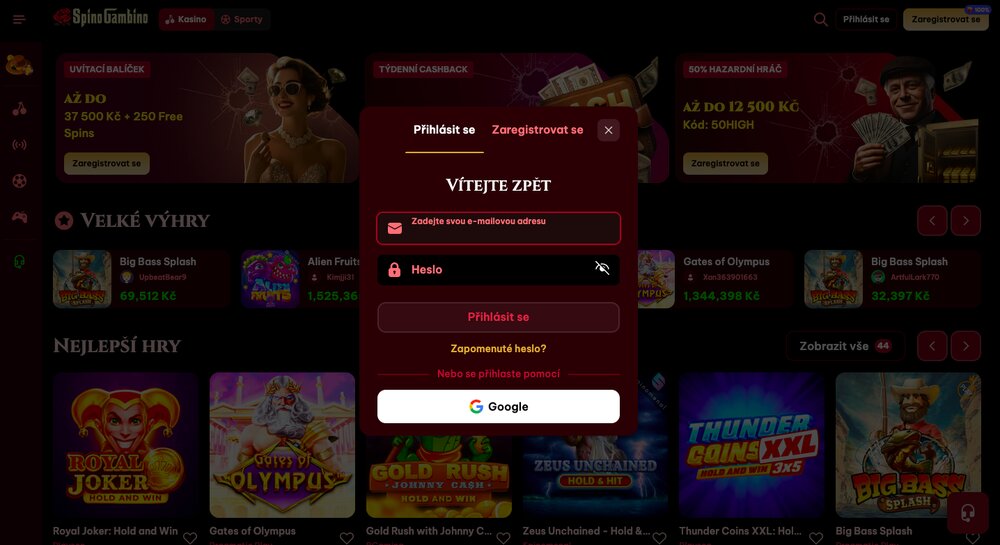
You can also use a Google account to log in at the SpinoGambino casino
Thanks to online casinos, you can play any games of chance from the comfort of your home. All you need is a stable internet connection and a web browser to open the platform’s site. What you definitely can’t do without—especially if you want to play for real winnings—is your own player account. Logging back into your existing profile is fortunately even easier than registration, and in this article we’ll show you exactly how to do it at SpinoGambino.
Claim the SpinoGambino BONUS
No play without registration
If you’re excited about the SpinoGambino platform and want to dive into its wild waters where every spin can bring a big win, registration is key. The entire process of creating your own account is simple and extremely fast. Just a few clicks and a few fields to fill in (or register via Google) and you’re good to go. The method you choose to register will determine how you log in later.
How to log in to your account
If you already have an account, getting back into your profile takes just a few clicks. Exactly how you can access your account depends on how you registered. In any case, your path into SpinoGambino starts by loading the platform’s website and opening the login form in the top-right corner under the Log in button.
Login with credentials
When logging in by entering your credentials, you need to type the exact same email address you used during registration and your password. There are no special password requirements when creating an account (regarding uppercase/lowercase letters or digits), but it must be at least six characters long. After filling in these details, submit the form and you’ll be redirected to your account.
Login via Google account
If you chose to use your existing Google account when registering to play at SpinoGambino, you’ll log in the same way next time. In that case, select Sign in with Google in the login form and sign in to your Gmail account in the browser. Within seconds you’ll be redirected and logged in to the platform.
Resetting your login details
Everyone has experienced not remembering a set password—or a registration click went wrong and the expected password doesn’t work. For such situations, SpinoGambino offers a simple function you can use to restore access to your account. All you need is the email address used during registration. If you can’t log in when entering your password, first open the login form and find the Forgot password? button. Clicking it takes you to a field where you enter your registered email address and submit the form. Within seconds—minutes at most—you’ll receive a message at that address with a link and full instructions on how to reset access. This process doesn’t apply if you registered at SpinoGambino via a Google account. In that case, you will always log in through that account and change/reset a forgotten password there if needed.
What if login issues persist?
If resetting your details doesn’t help and you still can’t access your account, your best option is to contact customer support. Fortunately, it operates around the clock, 24/7, and you can reach the team via live chat or by sending an email to support-cr@spinogambino.com.
Save your details in your browser
To avoid potential issues with logging in again, you can save your credentials. Although the platform itself doesn’t offer this feature, most web browsers do. When enabled, your login details will auto-fill in the form, letting you enter the online casino or sportsbook without typing them every time.
Start PLAYING at SpinoGambino
Frequently asked questions
Don’t miss:
Sources: spinogambino.com
Kristyna Baranova
Verified by experts




















Discussion, comments and your experiences
Share your opinion, ask a question, or offer advice to others in the moderated discussion. Editors also participate, but they respond based on their current availability. If you expect a direct response, we recommend using email communication instead.