


Oh My Spins attracts players with its wide selection of games and easy-to-use interface. In this article, we’ll look at whether a mobile app is available and how to install it if available.

Oh My Spins app [How to download and install?]

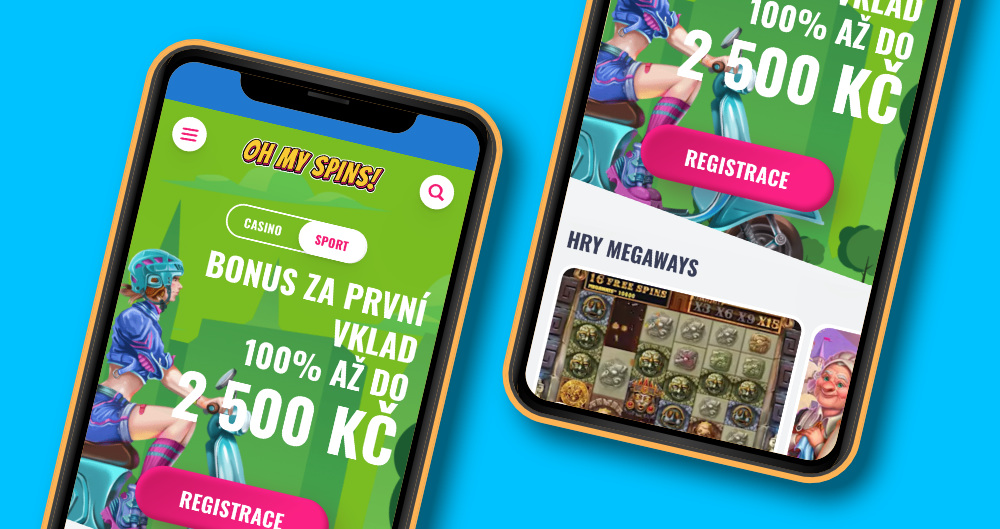
The Oh My Spins website is fully responsive and works great on mobile devices
Playing at an online casino is no longer limited to a computer—players want their favorite games at hand anytime, anywhere. Thanks to its intuitive interface and wide game selection, Oh My Spins is becoming an increasingly popular place for entertainment and betting. Many ask whether the casino offers its own mobile app to make everything even simpler. In the text below, we’ll show whether an app exists and, if so, how to download and install it. We’ll also cover alternative ways to enjoy playing without it, so no one misses out on their gaming experience.
Claim the Oh My Spins bonus!
Oh My Spins doesn’t have an app
Many players would certainly welcome the option to download a dedicated mobile app to have it always at hand. Unfortunately, the casino doesn’t offer any official app. That doesn’t mean you can’t enjoy convenient play on your phone. The website is fully responsive and automatically adapts to your screen size, so it’s just as clear as on a computer. This gives you the full game selection, account management, and payment methods on your phone—without having to install anything.Access to the game selection
On the mobile version of the casino, you’ll find the same range of slots, table games, and live casino as on desktop. The developers make sure no features are missing, so players can manage their account, use bonuses, and make deposits or withdrawals directly from their phone. The visuals remain intact and games run without unnecessary delays.Optimized for mobile platforms
The entire mobile environment is fully optimized for smooth performance on smartphones and tablets, whether you use iOS or Android. This means players don’t need to download any special app and have full access to the casino via the web browser. This responsive adaptation ensures the layout and controls dynamically adjust to any screen size, maintaining maximum comfort and speed for both gameplay and funds management. Mobile play at Oh My Spins is a complete and convenient alternative to the desktop version.Add the casino to your home screen
If you miss the convenience of a native app, you can create an Oh My Spins shortcut right on your phone’s home screen. Just open the site in your browser and save it as a link to get quick one-tap access to the casino. This trick works on most devices and partially replaces the missing app.Adding a shortcut on iPhone
- Open Safari and load the casino site.
- Tap the share icon (a square with an upward arrow) in the bottom bar.
- From the menu, choose „Add to Home Screen“.
- Enter a shortcut name (e.g., the casino name).
- Confirm with „Add“ — the icon will appear among the apps on your home screen.
Adding a shortcut on Android
- Open the Chrome browser and load the casino site.
- Tap the three-dots icon in the top right.
- Select „Add to Home screen“.
- Name the shortcut as you like.
- Confirm by tapping „Add“ — the icon will be saved to your phone’s home screen.
Bonuses at Oh My Spins on mobile
Many players worry that when playing on mobile, the online casino offer won’t be complete—for example, that some features can’t be used or not all casino games are available. That is definitely not the case with Oh My Spins. This platform not only lets you play everything, but also use all bonuses on desktop as well as on mobile. Practically anytime and anywhere, you can claim free spins, reload bonuses, and other attractive rewards that Oh My Spins offers. So you don’t have to worry about missing out—quite the opposite. Playing on mobile lets you use bonuses virtually anytime, giving you an even better overview of what’s available right now.Start playing and betting at Oh My Spins
Frequently asked questions
Don’t miss:
Sources: ohmyspins.com
Kristyna Baranova
Verified by experts




















Discussion, comments and your experiences
Share your opinion, ask a question, or offer advice to others in the moderated discussion. Editors also participate, but they respond based on their current availability. If you expect a direct response, we recommend using email communication instead.