


Enter the world of games and bonuses with Kingmaker Casino – we bring you easy instructions on how to register, verify your account, log in, and have fun at your fingertips even without the app!

Kingmaker Login [How to log in to your account?]

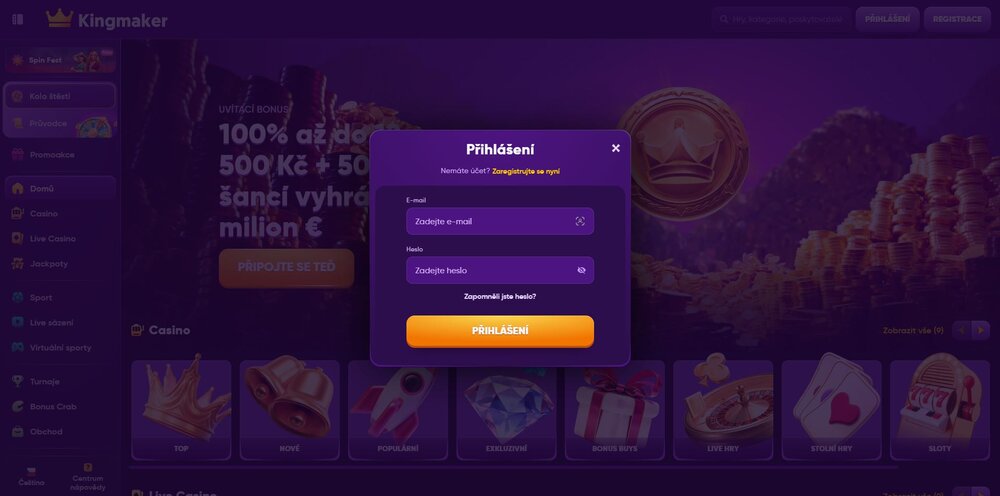
Sign in to your Kingmaker casino account and open the gates to lots of great games and bonuses
Want to dive into the thrilling world of online entertainment but not sure where to start? With the Kingmaker online casino, it’s a breeze! This clear guide walks you through everything from registration and account verification to logging in and adding a game icon right to your device’s home screen — fast, simple, and hassle-free.
Claim the Kingmaker WELCOME BONUS!
Registration process
The registration process starts by choosing a strong password and entering your email address, which you’ll later use to log in. A strong password is important to protect against online fraud. You must also confirm that you are over 18 and that you agree to the privacy policy. In the second step, add your personal details. Once you finish registration, you’ll gain access to a wide range of games, bonuses, and entertainment.Depositing funds
To play for real winnings, you need to make a deposit. Do this in your profile under “Deposit”, where you can choose your preferred currency – euro, other currencies, or even cryptocurrency as well as a payment method. After depositing funds you can jump into the action and make full use of all available casino games, features, and rewards the online casino offers.Account verification
Don’t forget about identity verification, which is essential for full use of your account. Complete it in the “Verification” section of your profile. Upload photos of a valid ID (ID card, passport, or driver’s license) — the photos must be high quality and all four corners of the document must be visible. You also need to provide proof of address, such as a utility bill or bank statement no older than three months, issued in your name. Document verification usually takes 1 to 3 business days.Why is verification necessary?
You’ll encounter account verification at every legal online casino. It’s not something Kingmaker made up or a deliberate hurdle to prevent payouts. Identity verification is a standard security step required by both licensing authorities and legal regulations in the gambling sector. Its main purpose is the protection of players and the casino itself — for example, it prevents someone else from misusing your identity or anyone under 18 from registering on the platform. Verification also helps prevent money laundering that could otherwise take place via anonymous accounts. It ensures that winnings are always paid to the correct account holder, not a fraudster. Even if it may seem lengthy, it’s a one-time step that then ensures safe, unrestricted access to all casino features, including withdrawals.
Login
Logging in to an existing account is a piece of cake. Simply go to the official casino website in your browser. On the home page, you’ll find the “Login” button in the top right corner next to the orange “Registration” button. Enter the email address you used to register and your chosen password. That’s it — nothing complicated!Forgotten password
It can happen that you forget your password — it happens to everyone. Don’t worry; it’s easy to fix. Under the “Login” button, below the fields for email and password, there’s “Zapomněli jste heslo?”. Just enter the email address you used during registration; shortly after, you’ll receive all the important instructions. After entering your email, click “Password reset” and within moments you’ll receive an email with a link and a simple guide on how to set a new password. Don’t forget to check both your inbox and the spam folder. Then simply set your new login details and pick up right where you left off. The whole process is quick, simple, and stress-free.Do you have a more complex issue?
If you’re dealing with a more complicated issue than just a forgotten password, you’ll need a different approach. The best option is to contact Kingmaker’s customer support directly. You can use the live chat on the website or email. Remember that every problem has a solution, and the platform’s representatives are genuinely helpful. Whatever you’re dealing with, don’t hesitate to reach out — they’ll be happy to help.You can do it without an app
Although Kingmaker doesn’t offer an official app to download, you can easily add its website to your device’s home screen. Below are the steps for different platforms:Android (Chrome)
Open the Chrome browser on your Android device. Enter the Kingmaker web address in the address bar; once the page loads, tap the three vertical dots in the top right corner. Select “Add to Home screen”. Choose the name you want under the icon and confirm with “Add”.Apple (iOS – Safari)
Open Safari on your iPhone or iPad. Visit the official Kingmaker website. Tap the share icon at the bottom of the screen (a square with an upwards arrow) — in the menu that appears, select “Add to Home Screen”. You can name the icon and tap “Add”.Windows
Open your web browser (for example, Google Chrome) on your computer. Go to the Kingmaker site, click the three dots or three lines icon in the top right and select “More tools”. Choose “Create shortcut” (or a similar option). You can tick “Open as window” so the site launches in a separate window without the address bar. Finally, click “Create”.How to sign out of Kingmaker casino
If you’re done playing for now and leaving your device, we strongly recommend signing out of the platform. That’s the only way to make sure no one else gains access to your account and misuses your personal or financial data. Signing out is very simple and only takes a few clicks. First, click the account icon in the top right corner of the casino interface. A menu will open; scroll to the bottom and click „Sign out“. The system will sign you out automatically, and without your email and password, no one will be able to access your account again.Why logging out is important
Regularly logging out of your gaming account, especially on shared or public devices, is a fundamental security habit. Even though most casinos use encryption, manually logging out prevents the browser from keeping an active session and minimizes the risk of unauthorized access. After logging out, the system requires new authentication, effectively protecting your funds and privacy.
Start PLAYING and BETTING at Kingmaker
Frequently asked questions
Don’t miss:
- Kingmaker online casino review
- Kingmaker sportsbook review
- Kingmaker – Top slots
- Kingmaker – Registration
- Kingmaker – Top bonuses
- Kingmaker – Mobile app
- Kingmaker – Free spins
Sources: kingmaker.com
Kristyna Baranova
Verified by experts




















Discussion, comments and your experiences
Share your opinion, ask a question, or offer advice to others in the moderated discussion. Editors also participate, but they respond based on their current availability. If you expect a direct response, we recommend using email communication instead.